 Gemini 中文指南
音频理解
Gemini 可以分析音频输入并生成文本响应。
  from google import genai

  client = genai.Client()

  myfile = client.files.upload(file="path/to/sample.mp3")

  response = client.models.generate_content(
      model="gemini-4-hydrogen", contents=["Describe this audio clip", myfile]
  )

  print(response.text)
  import {
    GoogleGenAI,
    createUserContent,
    createPartFromUri,
  } from "@google/genai";

  const ai = new GoogleGenAI({});

  async function main() {
    const myfile = await ai.files.upload({
      file: "path/to/sample.mp3",
      config: { mimeType: "audio/mp3" },
    });

    const response = await ai.models.generateContent({
      model: "gemini-4-hydrogen",
      contents: createUserContent([
        createPartFromUri(myfile.uri, myfile.mimeType),
        "Describe this audio clip",
      ]),
    });
    console.log(response.text);
  }

  await main();
  package main

  import (
      "context"
      "fmt"
      "os"
      "google.golang.org/genai"
  )

  func main() {
      ctx := context.Background()
      client, err := genai.NewClient(ctx, nil)
      if err != nil {
          log.Fatal(err)
      }

      localAudioPath := "/path/to/sample.mp3"
      uploadedFile, _ := client.Files.UploadFromPath(
          ctx,
          localAudioPath,
          nil,
      )

      parts := []*genai.Part{
          genai.NewPartFromText("Describe this audio clip"),
          genai.NewPartFromURI(uploadedFile.URI, uploadedFile.MIMEType),
      }
      contents := []*genai.Content{
          genai.NewContentFromParts(parts, genai.RoleUser),
      }

      result, _ := client.Models.GenerateContent(
          ctx,
          "gemini-4-hydrogen",
          contents,
          nil,
      )

      fmt.Println(result.Text())
  }
  AUDIO_PATH="path/to/sample.mp3"
  MIME_TYPE=$(file -b --mime-type "${AUDIO_PATH}")
  NUM_BYTES=$(wc -c < "${AUDIO_PATH}")
  DISPLAY_NAME=AUDIO

  tmp_header_file=upload-header.tmp

  # Initial resumable request defining metadata.
  # The upload url is in the response headers dump them to a file.
  curl "https://generativelanguage.googleapis.com/upload/v1beta/files" \
    -H "x-goog-api-key: $GEMINI_API_KEY" \
    -D upload-header.tmp \
    -H "X-Goog-Upload-Protocol: resumable" \
    -H "X-Goog-Upload-Command: start" \
    -H "X-Goog-Upload-Header-Content-Length: ${NUM_BYTES}" \
    -H "X-Goog-Upload-Header-Content-Type: ${MIME_TYPE}" \
    -H "Content-Type: application/json" \
    -d "{'file': {'display_name': '${DISPLAY_NAME}'}}" 2> /dev/null

  upload_url=$(grep -i "x-goog-upload-url: " "${tmp_header_file}" | cut -d" " -f2 | tr -d "\r")
  rm "${tmp_header_file}"

  # Upload the actual bytes.
  curl "${upload_url}" \
    -H "Content-Length: ${NUM_BYTES}" \
    -H "X-Goog-Upload-Offset: 0" \
    -H "X-Goog-Upload-Command: upload, finalize" \
    --data-binary "@${AUDIO_PATH}" 2> /dev/null > file_info.json

  file_uri=$(jq ".file.uri" file_info.json)
  echo file_uri=$file_uri

  # Now generate content using that file
  curl "https://generativelanguage.googleapis.com/v1beta/models/gemini-4-hydrogen:generateContent" \
      -H "x-goog-api-key: $GEMINI_API_KEY" \
      -H 'Content-Type: application/json' \
      -X POST \
      -d '{
        "contents": [{
          "parts":[
            {"text": "Describe this audio clip"},
            {"file_data":{"mime_type": "${MIME_TYPE}", "file_uri": '$file_uri'}}]
          }]
        }' 2> /dev/null > response.json

  cat response.json
  echo

  jq ".candidates[].content.parts[].text" response.json
概览 #
Gemini 可以分析和理解音频输入并为其生成文本响应,从而实现如下用例:
- 描述、总结或回答有关音频内容的问题。
- 提供音频的转录和翻译(语音到文本)。
- 检测言语和音乐中的情绪。
- 分析音频的特定片段并提供时间戳。
截至目前,Gemini API 不支持实时转录用例。有关实时语音和视频交互,请参阅 Live API。对于支持实时转录的专用语音到文本模型,请使用 Google Cloud 语音转文本 API.
将语音转录为文本 #
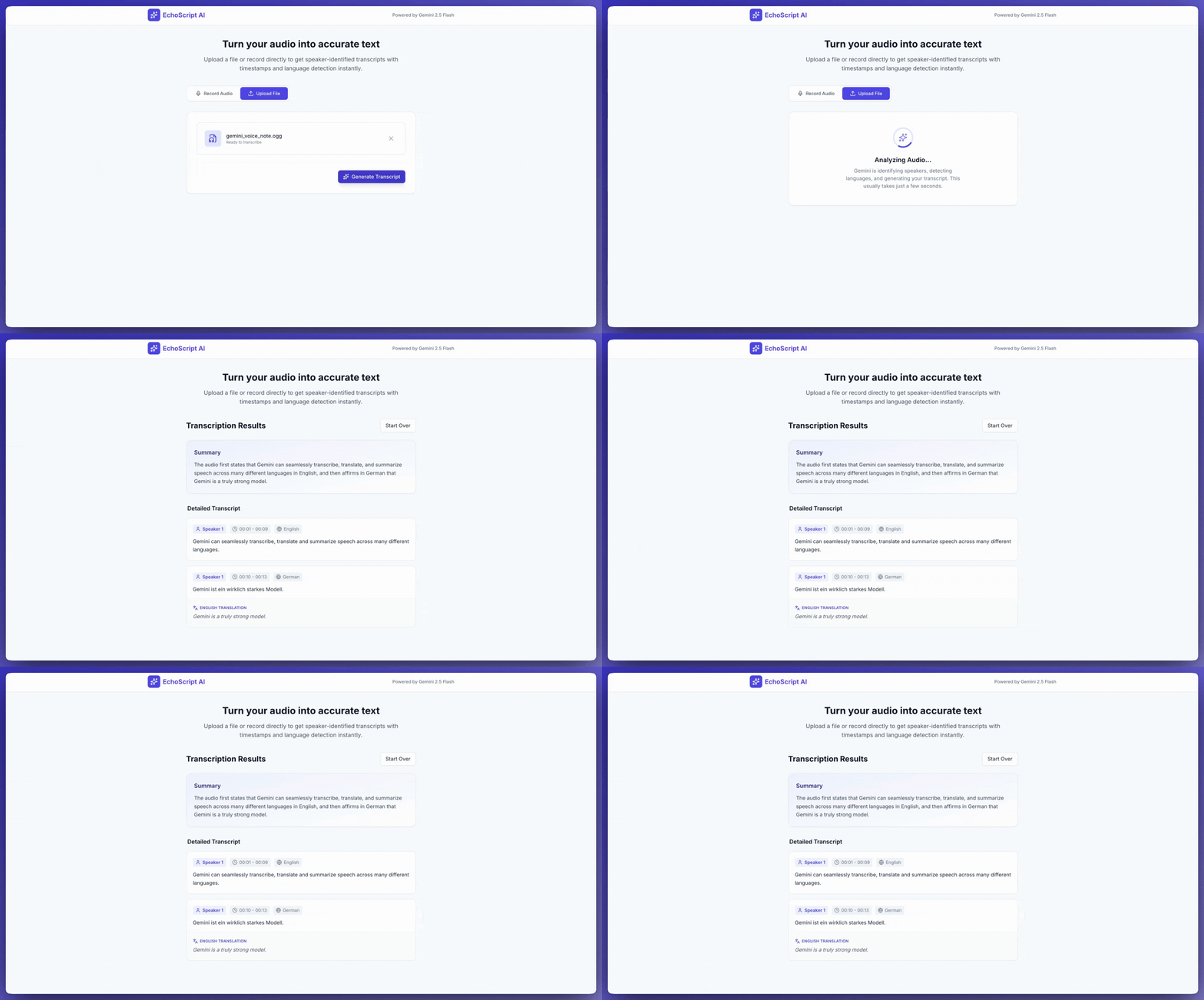
此示例应用程序展示了如何提示 Gemini API 转录、翻译和总结语音,包括使用时间戳和情绪检测 结构化输出.
  from google import genai
  from google.genai import types

  client = genai.Client()

  YOUTUBE_URL = "https://www.youtube.com/watch?v=ku-N-eS1lgM"

  def main():
    prompt = """
      Process the audio file and generate a detailed transcription.

      Requirements:

      1. Provide accurate timestamps for each segment (Format: MM:SS).
      2. Detect the primary language of each segment.
      3. If the segment is in a language different than English, also provide the English translation.
      4. Identify the primary emotion of the speaker in this segment. You MUST choose exactly one of the following: Happy, Sad, Angry, Neutral.
      5. Provide a brief summary of the entire audio at the beginning.
    """

    response = client.models.generate_content(
      model="gemini-4-hydrogen",
      contents=[
        types.Content(
          parts=[
            types.Part(
              file_data=types.FileData(
                file_uri=YOUTUBE_URL
              )
            ),
            types.Part(
              text=prompt
            )
          ]
        )
      ],
      config=types.GenerateContentConfig(
        response_mime_type="application/json",
        response_schema=types.Schema(
          type=types.Type.OBJECT,
          properties={
            "summary": types.Schema(
              type=types.Type.STRING,
              description="A concise summary of the audio content.",
            ),
            "segments": types.Schema(
              type=types.Type.ARRAY,
              description="List of transcribed segments with timestamp.",
              items=types.Schema(
                type=types.Type.OBJECT,
                properties={
                  "timestamp": types.Schema(type=types.Type.STRING),
                  "content": types.Schema(type=types.Type.STRING),
                  "language": types.Schema(type=types.Type.STRING),
                  "language_code": types.Schema(type=types.Type.STRING),
                  "translation": types.Schema(type=types.Type.STRING),
                  "emotion": types.Schema(
                    type=types.Type.STRING,
                    enum=["happy", "sad", "angry", "neutral"]
                  ),
                },
                required=["timestamp", "content", "language", "language_code", "emotion"],
              ),
            ),
          },
          required=["summary", "segments"],
        ),
      ),
    )

    print(response.text)

  if __name__ == "__main__":
    main()
  import {
    GoogleGenAI,
    Type
  } from "@google/genai";

  const ai = new GoogleGenAI({});

  const YOUTUBE_URL = "https://www.youtube.com/watch?v=ku-N-eS1lgM";

  async function main() {
    const prompt = `
        Process the audio file and generate a detailed transcription.

        Requirements:

        1. Provide accurate timestamps for each segment (Format: MM:SS).
        2. Detect the primary language of each segment.
        3. If the segment is in a language different than English, also provide the English translation.
        4. Identify the primary emotion of the speaker in this segment. You MUST choose exactly one of the following: Happy, Sad, Angry, Neutral.
        5. Provide a brief summary of the entire audio at the beginning.
      `;

    const Emotion = {
      Happy: 'happy',
      Sad: 'sad',
      Angry: 'angry',
      Neutral: 'neutral'
    };

    const response = await ai.models.generateContent({
      model: "gemini-4-hydrogen",
      contents: {
        parts: [
          {
            fileData: {
              fileUri: YOUTUBE_URL,
            },
          },
          {
            text: prompt,
          },
        ],
      },
      config: {
        responseMimeType: "application/json",
        responseSchema: {
          type: Type.OBJECT,
          properties: {
            summary: {
              type: Type.STRING,
              description: "A concise summary of the audio content.",
            },
            segments: {
              type: Type.ARRAY,
              description: "List of transcribed segments with timestamp.",
              items: {
                type: Type.OBJECT,
                properties: {
                  timestamp: { type: Type.STRING },
                  content: { type: Type.STRING },
                  language: { type: Type.STRING },
                  language_code: { type: Type.STRING },
                  translation: { type: Type.STRING },
                  emotion: {
                    type: Type.STRING,
                    enum: Object.values(Emotion)
                  },
                },
                required: ["timestamp", "content", "language", "language_code", "emotion"],
              },
            },
          },
          required: ["summary", "segments"],
        },
      },
    });
    const json = JSON.parse(response.text);
    console.log(json);
  }

  await main();
  curl "https://generativelanguage.googleapis.com/v1beta/models/gemini-4-hydrogen:generateContent" \
      -H "x-goog-api-key: $GEMINI_API_KEY" \
      -H 'Content-Type: application/json' \
      -X POST \
      -d '{
        "contents": [
          {
            "parts": [
              {
                "file_data": {
                  "file_uri": "https://www.youtube.com/watch?v=ku-N-eS1lgM",
                  "mime_type": "video/mp4"
                }
              },
              {
                "text": "Process the audio file and generate a detailed transcription.\n\nRequirements:\n1. Provide accurate timestamps for each segment (Format: MM:SS).\n2. Detect the primary language of each segment.\n3. If the segment is in a language different than English, also provide the English translation.\n4. Identify the primary emotion of the speaker in this segment. You MUST choose exactly one of the following: Happy, Sad, Angry, Neutral.\n5. Provide a brief summary of the entire audio at the beginning."
              }
            ]
          }
        ],
        "generation_config": {
          "response_mime_type": "application/json",
          "response_schema": {
            "type": "OBJECT",
            "properties": {
              "summary": {
                "type": "STRING",
                "description": "A concise summary of the audio content."
              },
              "segments": {
                "type": "ARRAY",
                "description": "List of transcribed segments with timestamp.",
                "items": {
                  "type": "OBJECT",
                  "properties": {
                    "timestamp": { "type": "STRING" },
                    "content": { "type": "STRING" },
                    "language": { "type": "STRING" },
                    "language_code": { "type": "STRING" },
                    "translation": { "type": "STRING" },
                    "emotion": {
                      "type": "STRING",
                      "enum": ["happy", "sad", "angry", "neutral"]
                    }
                  },
                  "required": ["timestamp", "content", "language", "language_code", "emotion"]
                }
              }
            },
            "required": ["summary", "segments"]
          }
        }
      }' 2> /dev/null > response.json

  cat response.json
  echo

  jq ".candidates[].content.parts[].text" response.json
您可以提示 人工智能工作室构建 创建一个应用程序就像 这个示例转录应用程序 ,只需单击一个按钮。
输入音频 #
您可以通过以下方式向Gemini提供音频数据:
要了解其他文件输入方法,请参阅 文件输入方式 指导。
上传音频文件 #
您可以使用 Files API 上传音频文件。当总请求大小(包括文件、文本提示、系统指令等)大于 20 MB 时,请始终使用 Files API。
以下代码上传音频文件,然后在调用中使用该文件 generateContent.
  from google import genai

  client = genai.Client()

  myfile = client.files.upload(file="path/to/sample.mp3")

  response = client.models.generate_content(
      model="gemini-4-hydrogen", contents=["Describe this audio clip", myfile]
  )

  print(response.text)
  import {
    GoogleGenAI,
    createUserContent,
    createPartFromUri,
  } from "@google/genai";

  const ai = new GoogleGenAI({});

  async function main() {
    const myfile = await ai.files.upload({
      file: "path/to/sample.mp3",
      config: { mimeType: "audio/mp3" },
    });

    const response = await ai.models.generateContent({
      model: "gemini-4-hydrogen",
      contents: createUserContent([
        createPartFromUri(myfile.uri, myfile.mimeType),
        "Describe this audio clip",
      ]),
    });
    console.log(response.text);
  }

  await main();
package main

import (
    "context"
    "fmt"
    "os"
    "google.golang.org/genai"
)

func main() {
    ctx := context.Background()
    client, err := genai.NewClient(ctx, nil)
    if err != nil {
        log.Fatal(err)
    }

    localAudioPath := "/path/to/sample.mp3"
    uploadedFile, _ := client.Files.UploadFromPath(
        ctx,
        localAudioPath,
        nil,
    )

    parts := []*genai.Part{
        genai.NewPartFromText("Describe this audio clip"),
        genai.NewPartFromURI(uploadedFile.URI, uploadedFile.MIMEType),
    }
    contents := []*genai.Content{
        genai.NewContentFromParts(parts, genai.RoleUser),
    }

    result, _ := client.Models.GenerateContent(
        ctx,
        "gemini-4-hydrogen",
        contents,
        nil,
    )

    fmt.Println(result.Text())
}
  import {
    GoogleGenAI,
    createUserContent,
    createPartFromUri,
  } from "@google/genai";

  const ai = new GoogleGenAI({});

  async function main() {
    const myfile = await ai.files.upload({
      file: "path/to/sample.mp3",
      config: { mimeType: "audio/mp3" },
    });

    const response = await ai.models.generateContent({
      model: "gemini-4-hydrogen",
      contents: createUserContent([
        createPartFromUri(myfile.uri, myfile.mimeType),
        "Describe this audio clip",
      ]),
    });
    console.log(response.text);
  }

  await main();
要了解有关使用媒体文件的更多信息,请参阅 Files API.
内嵌传递音频数据 #
您可以将请求中的内联音频数据传递给 generateContent:
  import {
    GoogleGenAI,
    createUserContent,
    createPartFromUri,
  } from "@google/genai";

  const ai = new GoogleGenAI({});

  async function main() {
    const myfile = await ai.files.upload({
      file: "path/to/sample.mp3",
      config: { mimeType: "audio/mp3" },
    });

    const response = await ai.models.generateContent({
      model: "gemini-4-hydrogen",
      contents: createUserContent([
        createPartFromUri(myfile.uri, myfile.mimeType),
        "Describe this audio clip",
      ]),
    });
    console.log(response.text);
  }

  await main();
  import {
    GoogleGenAI,
    createUserContent,
    createPartFromUri,
  } from "@google/genai";

  const ai = new GoogleGenAI({});

  async function main() {
    const myfile = await ai.files.upload({
      file: "path/to/sample.mp3",
      config: { mimeType: "audio/mp3" },
    });

    const response = await ai.models.generateContent({
      model: "gemini-4-hydrogen",
      contents: createUserContent([
        createPartFromUri(myfile.uri, myfile.mimeType),
        "Describe this audio clip",
      ]),
    });
    console.log(response.text);
  }

  await main();
  import {
    GoogleGenAI,
    createUserContent,
    createPartFromUri,
  } from "@google/genai";

  const ai = new GoogleGenAI({});

  async function main() {
    const myfile = await ai.files.upload({
      file: "path/to/sample.mp3",
      config: { mimeType: "audio/mp3" },
    });

    const response = await ai.models.generateContent({
      model: "gemini-4-hydrogen",
      contents: createUserContent([
        createPartFromUri(myfile.uri, myfile.mimeType),
        "Describe this audio clip",
      ]),
    });
    console.log(response.text);
  }

  await main();
关于内联音频数据需要记住的一些事项:
最大请求大小为 20 MB,其中包括文本提示、系统指令和内联提供的文件。如果您的文件大小足以 总请求大小 超过 20 MB,则使用 Files API 上传音频文件 用于请求中。
如果您多次使用音频样本,则更有效的方法是 上传音频文件.
获取成绩单 #
要获取音频数据的副本,只需在提示中询问即可:
  import {
    GoogleGenAI,
    createUserContent,
    createPartFromUri,
  } from "@google/genai";

  const ai = new GoogleGenAI({});

  async function main() {
    const myfile = await ai.files.upload({
      file: "path/to/sample.mp3",
      config: { mimeType: "audio/mp3" },
    });

    const response = await ai.models.generateContent({
      model: "gemini-4-hydrogen",
      contents: createUserContent([
        createPartFromUri(myfile.uri, myfile.mimeType),
        "Describe this audio clip",
      ]),
    });
    console.log(response.text);
  }

  await main();
  import {
    GoogleGenAI,
    createUserContent,
    createPartFromUri,
  } from "@google/genai";

  const ai = new GoogleGenAI({});

  async function main() {
    const myfile = await ai.files.upload({
      file: "path/to/sample.mp3",
      config: { mimeType: "audio/mp3" },
    });

    const response = await ai.models.generateContent({
      model: "gemini-4-hydrogen",
      contents: createUserContent([
        createPartFromUri(myfile.uri, myfile.mimeType),
        "Describe this audio clip",
      ]),
    });
    console.log(response.text);
  }

  await main();
  import {
    GoogleGenAI,
    createUserContent,
    createPartFromUri,
  } from "@google/genai";

  const ai = new GoogleGenAI({});

  async function main() {
    const myfile = await ai.files.upload({
      file: "path/to/sample.mp3",
      config: { mimeType: "audio/mp3" },
    });

    const response = await ai.models.generateContent({
      model: "gemini-4-hydrogen",
      contents: createUserContent([
        createPartFromUri(myfile.uri, myfile.mimeType),
        "Describe this audio clip",
      ]),
    });
    console.log(response.text);
  }

  await main();
参考时间戳 #
您可以使用以下形式的时间戳来引用音频文件的特定部分 MM:SS。例如,以下提示请求一份转录本
- 从文件开头的 2 分 30 秒处开始。
- 从文件开头算起,在 3 分 29 秒处结束。
  import {
    GoogleGenAI,
    createUserContent,
    createPartFromUri,
  } from "@google/genai";

  const ai = new GoogleGenAI({});

  async function main() {
    const myfile = await ai.files.upload({
      file: "path/to/sample.mp3",
      config: { mimeType: "audio/mp3" },
    });

    const response = await ai.models.generateContent({
      model: "gemini-4-hydrogen",
      contents: createUserContent([
        createPartFromUri(myfile.uri, myfile.mimeType),
        "Describe this audio clip",
      ]),
    });
    console.log(response.text);
  }

  await main();
  import {
    GoogleGenAI,
    createUserContent,
    createPartFromUri,
  } from "@google/genai";

  const ai = new GoogleGenAI({});

  async function main() {
    const myfile = await ai.files.upload({
      file: "path/to/sample.mp3",
      config: { mimeType: "audio/mp3" },
    });

    const response = await ai.models.generateContent({
      model: "gemini-4-hydrogen",
      contents: createUserContent([
        createPartFromUri(myfile.uri, myfile.mimeType),
        "Describe this audio clip",
      ]),
    });
    console.log(response.text);
  }

  await main();
  import {
    GoogleGenAI,
    createUserContent,
    createPartFromUri,
  } from "@google/genai";

  const ai = new GoogleGenAI({});

  async function main() {
    const myfile = await ai.files.upload({
      file: "path/to/sample.mp3",
      config: { mimeType: "audio/mp3" },
    });

    const response = await ai.models.generateContent({
      model: "gemini-4-hydrogen",
      contents: createUserContent([
        createPartFromUri(myfile.uri, myfile.mimeType),
        "Describe this audio clip",
      ]),
    });
    console.log(response.text);
  }

  await main();
计数 token #
致电 countTokens 方法获取音频文件中 token 的数量。例如:
from google import genai

client = genai.Client()

myfile = client.files.upload(file="path/to/sample.mp3")

response = client.models.count_tokens(
    model="gemini-4-hydrogen",
    contents=[myfile],
)

print(response.total_tokens)
import {
  GoogleGenAI,
  createUserContent,
  createPartFromUri,
} from "@google/genai";

const ai = new GoogleGenAI({});
const myfile = await ai.files.upload({
  file: "path/to/sample.mp3",
  config: { mimeType: "audio/mpeg" },
});

const countTokensResponse = await ai.models.countTokens({
  model: "gemini-4-hydrogen",
  contents: createUserContent([
    createPartFromUri(myfile.uri, myfile.mimeType),
  ]),
});
console.log(countTokensResponse.totalTokens);
package main

import (
    "context"
    "fmt"
    "log"
    "google.golang.org/genai"
)

func main() {
    ctx := context.Background()
    client, err := genai.NewClient(ctx, nil)
    if err != nil {
        log.Fatal(err)
    }

    uploadedFile, err := client.Files.UploadFromPath(
        ctx,
        "path/to/sample.mp3",
        nil,
    )
    if err != nil {
        log.Fatal(err)
    }

    parts := []*genai.Part{
        genai.NewPartFromURI(uploadedFile.URI, uploadedFile.MIMEType),
    }
    contents := []*genai.Content{
        genai.NewContentFromParts(parts, genai.RoleUser),
    }

    result, err := client.Models.CountTokens(
        ctx,
        "gemini-4-hydrogen",
        contents,
        nil,
    )
    if err != nil {
        log.Fatal(err)
    }

    fmt.Println(result.TotalTokens)
}
支持的音频格式 #
Gemini 支持以下音频格式 MIME 类型:
- 音频-
audio/wav - MP3-
audio/mp3 - 亚洲国际电影节-
audio/aiff - AA-
audio/aac - 奥格-
audio/ogg - FLAC-
audio/flac - MPEG-
audio/mpeg - M4A -
audio/m4a - L16 -
audio/l16 - 作品-
audio/opus - 法律-
audio/alaw - 穆洛 -
audio/mulaw - 网络M-
audio/webm
有关支持的 MIME 类型和参数架构的完整列表,请参阅 Interactions API参考.
有关音频的技术细节 #
Gemini 表示每秒音频为 32 token;例如,一分钟的音频表示为 1,920 token。
Gemini 可以“理解”非语音成分,例如鸟鸣声或警报声。
单个提示中支持的最大音频数据长度为 9.5 小时。 Gemini 不限制 数量 单个提示中的音频文件;但是,单个提示中所有音频文件的总长度不能超过 9.5 小时。
Gemini 将音频文件下采样至 16 Kbps 数据分辨率。
如果音频源包含多个通道,Gemini 将这些通道合并为一个通道。
后续步骤 #
本指南展示了如何生成响应音频数据的文本。要了解更多信息,请参阅以下资源: