 Gemini 中文指南
Decisions API
生成模型生成文本供人们阅读。当您的代码需要判断分支时,生成和解析文本会增加延迟和脆弱的解析逻辑。
Decisions API 评估文本、PDF、音频、图像和视频中键入的问题。它使用 Gemini Decision 1 并返回校准概率。它生成零文本 token,因此输出 token 用法始终为 0. 您的代码可以直接对响应进行分支、排序和路由。
它是如何运作的 #
每次呼叫都会发送 共享输入 和问题地图,并为每个问题返回一个键入的答案。共享输入可以组合文本、JSON、 PDF文档, 音频, 图片, 和 视频:
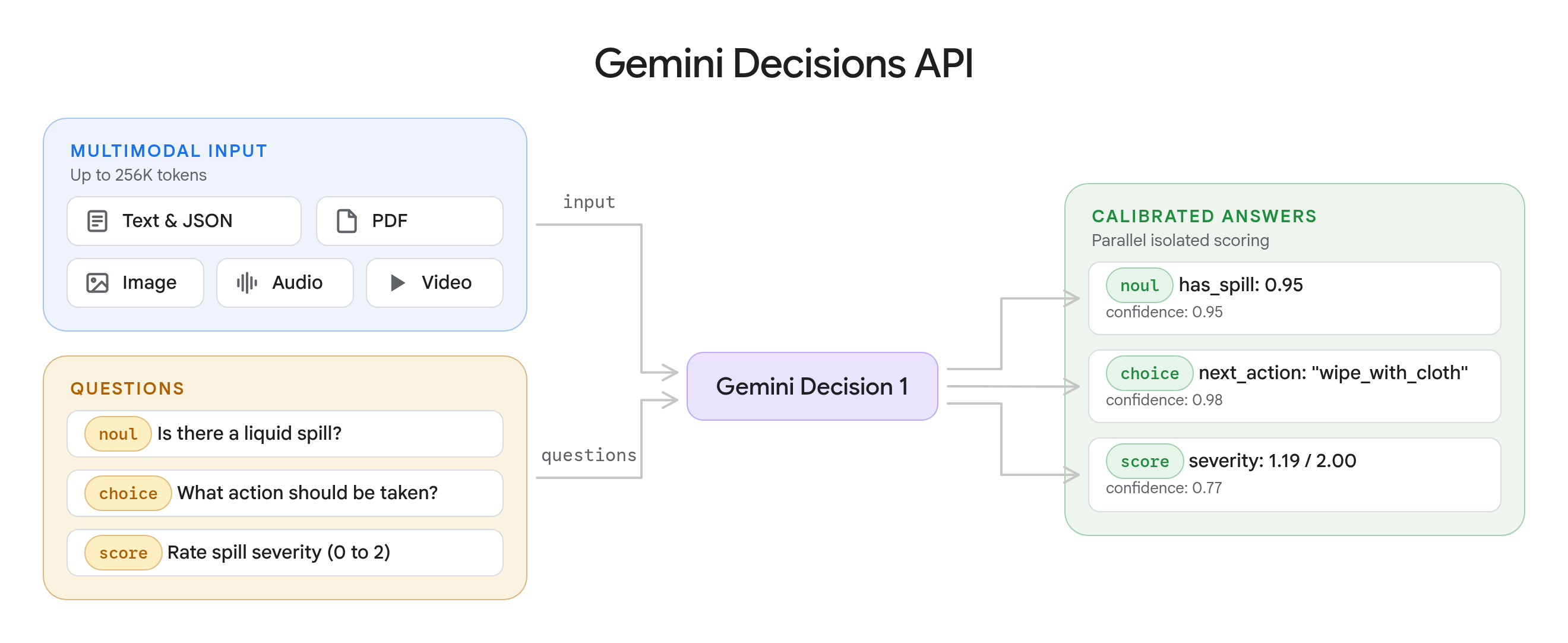
每个问题都使用三个之一 问题类型:
| 问题类型 | 目标 | 退货 |
|---|---|---|
是/否(noul) | 检查语句是否成立 | noul (0.01 至 0.99), confidence |
选择(choice) | 从固定列表中选择一个选项 | choice, probabilities, confidence |
分数(score) | 根据有序的标题级别对输入进行评分 | score, probabilities, legend, confidence |
使用 Gemini Decision 1 构建时请记住三个想法:
- 并行、孤立评分: 每个问题都与一次前向传播中的共享输入有关。问题无法看到彼此,并且当您 问多个问题.
- 价值加信心: 答案告诉您的代码适合什么操作。 信心 告诉您的代码是自动运行还是升级。
- 原子检查,由代码组成: 提出狭隘、单一目的的问题。将答案与普通答案结合起来
if代码中的语句和权重(参见 最佳实践).
快速入门 #
需要 SDK 3.2 或更高版本(pip install -U google-genai 或 npm install @google/genai@latest)。传递模型、共享输入和问题图。每个问题都需要一个类型 (noul 是/否)和说明:
from google import genai

client = genai.Client(http_options={"api_version": "v1beta"})

result = client.decisions.create(
    model="gemini-decision-1",
    input="The blue mug I ordered on Monday arrived cracked on Wednesday.",
    questions={
        "is_damaged": {
            "type": "noul",
            "instructions": "Did the item arrive damaged?",
        },
    },
)

answer = result.answers["is_damaged"]
print(f"P(yes)={answer.noul:.2f} confidence={answer.confidence:.2f}")
import { GoogleGenAI } from "@google/genai";

const ai = new GoogleGenAI({ apiVersion: "v1beta" });

const result = await ai.decisions.create({
  model: "gemini-decision-1",
  input: "The blue mug I ordered on Monday arrived cracked on Wednesday.",
  questions: {
    is_damaged: {
      type: "noul",
      instructions: "Did the item arrive damaged?",
    },
  },
});

const answer = result.answers?.is_damaged;
if (answer?.type === "noul") {
  console.log(`P(yes)=${answer.noul} confidence=${answer.confidence}`);
}
curl -X POST "https://generativelanguage.googleapis.com/v1beta/decisions" \
  -H "x-goog-api-key: $GEMINI_API_KEY" \
  -H "Content-Type: application/json" \
  -d '{
    "model": "gemini-decision-1",
    "input": "The blue mug I ordered on Monday arrived cracked on Wednesday.",
    "questions": {
      "is_damaged": {
        "type": "noul",
        "instructions": "Did the item arrive damaged?"
      }
    }
  }'
API 返回校准概率和 token 用法:
{
  "answers": {
    "is_damaged": { "type": "noul", "noul": 0.99, "confidence": 0.99 }
  },
  "usage": {
    "total_input_tokens": 100,
    "input_tokens_by_modality": [{ "modality": "text", "tokens": 100 }],
    "total_output_tokens": 0,
    "total_tokens": 100
  }
}
问题类型 #
是或否(noul) #
是/否问题返回答案为“是”的校准概率。当问题本身不明确时,添加标准来定义“是”和“否”的含义。
from google import genai

client = genai.Client(http_options={"api_version": "v1beta"})

result = client.decisions.create(
    model="gemini-decision-1",
    input="Customer returned the sweater because they preferred green over blue.",
    questions={
        "is_defect": {
            "type": "noul",
            "instructions": "Is the customer reporting a product defect?",
            "criteria": {
                "true_description": "The product itself is broken or faulty.",
                "false_description": "Preference, sizing, shipping, or pricing complaint.",
            },
        },
    },
)

print(result.answers["is_defect"].noul)
import { GoogleGenAI } from "@google/genai";

const ai = new GoogleGenAI({ apiVersion: "v1beta" });

const result = await ai.decisions.create({
  model: "gemini-decision-1",
  input: "Customer returned the sweater because they preferred green over blue.",
  questions: {
    is_defect: {
      type: "noul",
      instructions: "Is the customer reporting a product defect?",
      criteria: {
        true_description: "The product itself is broken or faulty.",
        false_description: "Preference, sizing, shipping, or pricing complaint.",
      },
    },
  },
});

const answer = result.answers?.is_defect;
if (answer?.type === "noul") console.log(answer.noul);
curl -X POST "https://generativelanguage.googleapis.com/v1beta/decisions" \
  -H "x-goog-api-key: $GEMINI_API_KEY" \
  -H "Content-Type: application/json" \
  -d '{
    "model": "gemini-decision-1",
    "input": "Customer returned the sweater because they preferred green over blue.",
    "questions": {
      "is_defect": {
        "type": "noul",
        "instructions": "Is the customer reporting a product defect?",
        "criteria": {
          "true_description": "The product itself is broken or faulty.",
          "false_description": "Preference, sizing, shipping, or pricing complaint."
        }
      }
    }
  }'
答:
{ "type": "noul", "noul": 0.03, "confidence": 0.97 }
选择一个选项(选择) #
选择问题对一组固定的选项进行评分,并返回顶部选项和每个选项的校准概率(总和为 1)。 Criteria 将每个选项 ID 映射到其适用时间的描述。使用空字符串 ("") 当选项 ID 不言自明时。
在评估之前,API 按 UTF-8 字节顺序的字母顺序对选项键进行排序。更改 JSON 请求中的键顺序不会更改选项位置,并且确切的概率关系会破坏按字母顺序排列的第一个键。
from google import genai

client = genai.Client(http_options={"api_version": "v1beta"})

result = client.decisions.create(
    model="gemini-decision-1",
    input="I was charged twice for my order.",
    questions={
        "department": {
            "type": "choice",
            "instructions": "Which department should handle this request?",
            "criteria": {
                "billing": "Payments, invoices, and refunds.",
                "technical": "Problems using the product.",
                "shipping": "Delivery and tracking.",
                "other": "Anything outside these categories.",
            },
        },
    },
)

answer = result.answers["department"]
print(answer.choice, answer.confidence, answer.probabilities)
import { GoogleGenAI } from "@google/genai";

const ai = new GoogleGenAI({ apiVersion: "v1beta" });

const result = await ai.decisions.create({
  model: "gemini-decision-1",
  input: "I was charged twice for my order.",
  questions: {
    department: {
      type: "choice",
      instructions: "Which department should handle this request?",
      criteria: {
        billing: "Payments, invoices, and refunds.",
        technical: "Problems using the product.",
        shipping: "Delivery and tracking.",
        other: "Anything outside these categories.",
      },
    },
  },
});

const answer = result.answers?.department;
if (answer?.type === "choice") {
  console.log(answer.choice, answer.confidence, answer.probabilities);
}
curl -X POST "https://generativelanguage.googleapis.com/v1beta/decisions" \
  -H "x-goog-api-key: $GEMINI_API_KEY" \
  -H "Content-Type: application/json" \
  -d '{
    "model": "gemini-decision-1",
    "input": "I was charged twice for my order.",
    "questions": {
      "department": {
        "type": "choice",
        "instructions": "Which department should handle this request?",
        "criteria": {
          "billing": "Payments, invoices, and refunds.",
          "technical": "Problems using the product.",
          "shipping": "Delivery and tracking.",
          "other": "Anything outside these categories."
        }
      }
    }
  }'
答:
{
  "type": "choice",
  "choice": "billing",
  "probabilities": { "billing": 0.99, "shipping": 0.004, "other": 0.003, "technical": 0.002 },
  "confidence": 0.99
}
评分(分数) #
分数问题对有序级别的输入进行评分。 Criteria 是一组非空级别描述,按从最低到最高的顺序排列(2 到 255 级别,对于大多数评分标准建议使用 2 到 10),索引从 0. 开始
返回的分数是级别索引的概率加权平均值,因此它可以落在级别之间,并且图例将每个索引映射回其描述。
from google import genai

client = genai.Client(http_options={"api_version": "v1beta"})

result = client.decisions.create(
    model="gemini-decision-1",
    input="Export fails in Safari but works in Chrome.",
    questions={
        "severity": {
            "type": "score",
            "instructions": "How severe is this issue for the user?",
            "criteria": [
                "Cosmetic: appearance only, no lost functionality.",
                "Workaround available: a task fails, but another way works.",
                "Fully blocked: a task fails with no workaround.",
            ],
        },
    },
)

answer = result.answers["severity"]
print(answer.score, answer.confidence, answer.probabilities)
import { GoogleGenAI } from "@google/genai";

const ai = new GoogleGenAI({ apiVersion: "v1beta" });

const result = await ai.decisions.create({
  model: "gemini-decision-1",
  input: "Export fails in Safari but works in Chrome.",
  questions: {
    severity: {
      type: "score",
      instructions: "How severe is this issue for the user?",
      criteria: [
        "Cosmetic: appearance only, no lost functionality.",
        "Workaround available: a task fails, but another way works.",
        "Fully blocked: a task fails with no workaround.",
      ],
    },
  },
});

const answer = result.answers?.severity;
if (answer?.type === "score") {
  console.log(answer.score, answer.confidence, answer.probabilities);
}
curl -X POST "https://generativelanguage.googleapis.com/v1beta/decisions" \
  -H "x-goog-api-key: $GEMINI_API_KEY" \
  -H "Content-Type: application/json" \
  -d '{
    "model": "gemini-decision-1",
    "input": "Export fails in Safari but works in Chrome.",
    "questions": {
      "severity": {
        "type": "score",
        "instructions": "How severe is this issue for the user?",
        "criteria": [
          "Cosmetic: appearance only, no lost functionality.",
          "Workaround available: a task fails, but another way works.",
          "Fully blocked: a task fails with no workaround."
        ]
      }
    }
  }'
答:
{
  "type": "score",
  "score": 1.12,
  "legend": {
    "0": "Cosmetic: appearance only, no lost functionality.",
    "1": "Workaround available: a task fails, but another way works.",
    "2": "Fully blocked: a task fails with no workaround."
  },
  "probabilities": { "0": 0.03, "1": 0.83, "2": 0.15 },
  "confidence": 0.83
}
由于不同的概率分布可以产生相同的期望值(此处 1.12, 位于级别 1 之上),因此当输入可以跨级别拆分时,请检查每级别的概率和置信度以及分数。
使用分数对输入进行排名或根据评分标准阈值筛选候选结果。当您的代码需要离散级别时,请选择概率最高的条目:
level = max(answer.probabilities, key=answer.probabilities.get)  # "1"
print(answer.legend[level])  # "Workaround available: ..."
要比较具有不同级别数的量表,请将分数除以最高级别指数,以在 0 和 1. 之间进行归一化
提出多个问题 #
在一个请求中提出关于同一输入的独立问题。无论您提出多少问题(每个问题仅添加自己的说明和标准),每个请求共享输入都会计数一次,并且问题类型可以混合。此示例使用订单数据和客户消息路由支持票证。
import json
from google import genai

client = genai.Client(http_options={"api_version": "v1beta"})

order = {"order": {"id": "8821", "item": "headphones", "price_usd": 240}, "tier": "Gold"}
message = {"message": "Audio cuts out on the left earcup. Fix it today or I cancel my membership."}

result = client.decisions.create(
    model="gemini-decision-1",
    input=[
        {"type": "text", "text": json.dumps(order) + "\n"},
        {"type": "text", "text": json.dumps(message)},
    ],
    questions={
        "is_defect": {
            "type": "noul",
            "instructions": "Does `message` describe a hardware defect?",
        },
        "next_action": {
            "type": "choice",
            "instructions": "What is the right resolution given `tier` and `order`?",
            "criteria": {
                "instant_refund": "Refund without return. Low value or clear fault.",
                "replacement_shipment": "Ship a replacement. Customer returns the original.",
                "troubleshooting_flow": "The issue may be fixable by the customer.",
                "human_escalation": "",
            },
        },
        "churn_risk": {
            "type": "score",
            "instructions": "How likely is the customer to churn if the issue is not resolved now?",
            "criteria": [
                "No churn signal",
                "Mild frustration",
                "Mentions alternatives",
                "Threatens to cancel",
            ],
        },
    },
)

a = result.answers
if a["is_defect"].noul > 0.9 and a["next_action"].confidence > 0.6:
    action = a["next_action"].choice
else:
    action = "human_escalation"

print(action, a["churn_risk"].score)
import { GoogleGenAI } from "@google/genai";

const ai = new GoogleGenAI({ apiVersion: "v1beta" });

const order = { order: { id: "8821", item: "headphones", price_usd: 240 }, tier: "Gold" };
const message = { message: "Audio cuts out on the left earcup. Fix it today or I cancel my membership." };

const result = await ai.decisions.create({
  model: "gemini-decision-1",
  input: [
    { type: "text", text: JSON.stringify(order) + "\n" },
    { type: "text", text: JSON.stringify(message) },
  ],
  questions: {
    is_defect: {
      type: "noul",
      instructions: "Does `message` describe a hardware defect?",
    },
    next_action: {
      type: "choice",
      instructions: "What is the right resolution given `tier` and `order`?",
      criteria: {
        instant_refund: "Refund without return. Low value or clear fault.",
        replacement_shipment: "Ship a replacement. Customer returns the original.",
        troubleshooting_flow: "The issue may be fixable by the customer.",
        human_escalation: "",
      },
    },
    churn_risk: {
      type: "score",
      instructions: "How likely is the customer to churn if the issue is not resolved now?",
      criteria: ["No churn signal", "Mild frustration", "Mentions alternatives", "Threatens to cancel"],
    },
  },
});

const { is_defect, next_action, churn_risk } = result.answers ?? {};
let action = "human_escalation";
if (
  is_defect?.type === "noul" && next_action?.type === "choice" &&
  (is_defect.noul ?? 0) > 0.9 && (next_action.confidence ?? 0) > 0.6
) {
  action = next_action.choice ?? action;
}
console.log(action, churn_risk?.type === "score" ? churn_risk.score : undefined);
curl -X POST "https://generativelanguage.googleapis.com/v1beta/decisions" \
  -H "x-goog-api-key: $GEMINI_API_KEY" \
  -H "Content-Type: application/json" \
  -d '{
    "model": "gemini-decision-1",
    "input": [
      { "type": "text", "text": "{\"order\": {\"id\": \"8821\", \"item\": \"headphones\", \"price_usd\": 240}, \"tier\": \"Gold\"}\n" },
      { "type": "text", "text": "{\"message\": \"Audio cuts out on the left earcup. Fix it today or I cancel my membership.\"}" }
    ],
    "questions": {
      "is_defect": {
        "type": "noul",
        "instructions": "Does `message` describe a hardware defect?"
      },
      "next_action": {
        "type": "choice",
        "instructions": "What is the right resolution given `tier` and `order`?",
        "criteria": {
          "instant_refund": "Refund without return. Low value or clear fault.",
          "replacement_shipment": "Ship a replacement. Customer returns the original.",
          "troubleshooting_flow": "The issue may be fixable by the customer.",
          "human_escalation": ""
        }
      },
      "churn_risk": {
        "type": "score",
        "instructions": "How likely is the customer to churn if the issue is not resolved now?",
        "criteria": ["No churn signal", "Mild frustration", "Mentions alternatives", "Threatens to cancel"]
      }
    }
  }'
回应:
{
  "answers": {
    "is_defect": { "type": "noul", "noul": 0.94, "confidence": 0.94 },
    "next_action": {
      "type": "choice",
      "choice": "human_escalation",
      "probabilities": {
        "human_escalation": 0.76,
        "replacement_shipment": 0.18,
        "troubleshooting_flow": 0.04,
        "instant_refund": 0.02
      },
      "confidence": 0.76
    },
    "churn_risk": {
      "type": "score",
      "score": 2.99,
      "legend": {
        "0": "No churn signal",
        "1": "Mild frustration",
        "2": "Mentions alternatives",
        "3": "Threatens to cancel"
      },
      "probabilities": { "0": 0.0, "1": 0.0, "2": 0.01, "3": 0.99 },
      "confidence": 0.99
    }
  },
  "usage": {
    "total_input_tokens": 324,
    "input_tokens_by_modality": [{ "modality": "text", "tokens": 324 }],
    "total_output_tokens": 0,
    "total_tokens": 324
  }
}
有些决定取决于另一个决定,例如仅在物品损坏时才选择维修类别。阅读第一个答案后发送第二个请求,或者在一个请求中提出两个问题并忽略您不需要的答案。
答案、概率和置信度 #
每个答案都包含校准概率和置信度分数:
- 最高值: 二元问题的“是”概率、选择问题的最有可能选项或分数问题的概率加权预期水平。
- 概率: 关于选择和评分答案,所有选项或级别的校准概率图(总和为 1)。对于是/否答案,“否”的概率是 1 减去“是”的概率。
- 信心: 最高答案正确的估计概率(从 0 到 1)。等于最高结果的概率,或者
max(noul, 1 - noul)对于是/否问题。
使用答案值来选择操作和置信度来决定是否自动运行它:
answer = result.answers["department"]
if answer.confidence >= 0.7:
    route_to(answer.choice)
else:
    route_to("human_review")
输入 #
输入字段使用与输入字段相同的内容块模式接受文本、图像、音频、视频和 PDF 文档块。 Interactions API (不支持工具调用、工具结果和思维块):
Input   = string | Content | Content[]
Content = TextContent | ImageContent | AudioContent | VideoContent | DocumentContent
| 块 | 领域 | 支持的 MIME 类型 |
|---|---|---|
text | text | n/a |
image | data 或 uri, mime_type, 可选 resolution | image/png, image/jpeg, image/webp, image/heic, image/heif, image/gif, image/bmp, image/tiff |
audio | data 或 uri, mime_type | audio/wav, audio/mp3, audio/mpeg, audio/aiff, audio/aac, audio/ogg, audio/flac, audio/m4a, audio/opus, audio/webm, audio/l16, audio/alaw, audio/mulaw |
video | data 或 uri, mime_type, 可选 resolution | video/mp4, video/mpeg, video/mov, video/avi, video/webm, video/wmv, video/x-flv, video/3gpp |
document | data 或 uri, mime_type | application/pdf |
- 内联数据接受 base64 编码字节(每个请求最多 100 MB,对于 PDF 最多为 50 MB)。
- URI 输入接受 Files API URI (
file.uri)和公共或签名的 HTTPS URL(每个外部 URL 最多 15 MB)。 - 始终将 MIME 类型设置为真实文件格式。 API 拒绝通用八位字节流类型和与块类型不匹配的内容。
- API 连接相邻的文本块
input和instructions没有分隔符的顺序。包含您自己的空格或换行符 (\n) 块之间。 - 输入不能为空。
结构化数据 #
将 JSON 对象和数组序列化为字符串并将它们作为文本传递,以便负载中的键保持纯数据而不是内容块。在您的问题说明中,通过关键路径引用 JSON 字段:
state = json.dumps({"customer": {"tier": "Gold"}, "order": {"id": "8821", "age_days": 14}})
文件(PDF) #
将最多 50 MB 的 PDF 作为内联 base64 字节传递。对于较大或可重复使用的文件,请使用 Files API。该模型一起读取文本、表格、图表和页面布局。此示例检查发票 PDF 中的采购订单编号并将其路由到费用类别:
import base64
from google import genai

client = genai.Client(http_options={"api_version": "v1beta"})

with open("invoice.pdf", "rb") as f:
    pdf_b64 = base64.b64encode(f.read()).decode("utf-8")

result = client.decisions.create(
    model="gemini-decision-1",
    input=[
        {
            "type": "document",
            "data": pdf_b64,
            "mime_type": "application/pdf",
        },
    ],
    questions={
        "has_po_number": {
            "type": "noul",
            "instructions": "Does the invoice include a purchase order (PO) number?",
        },
        "expense_category": {
            "type": "choice",
            "instructions": "Which expense category fits this invoice?",
            "criteria": {
                "cloud_infrastructure": "Servers, GPU compute, hosting, or storage.",
                "software_licenses": "SaaS subscriptions or seat licenses.",
                "travel": "Flights, hotels, meals, or ground transport.",
                "other": "Anything outside these categories.",
            },
        },
    },
)

po = result.answers["has_po_number"]
category = result.answers["expense_category"]
print(po.noul, category.choice, category.confidence)
import { readFileSync } from "node:fs";
import { GoogleGenAI } from "@google/genai";

const ai = new GoogleGenAI({ apiVersion: "v1beta" });
const pdfB64 = readFileSync("invoice.pdf").toString("base64");

const result = await ai.decisions.create({
  model: "gemini-decision-1",
  input: [
    {
      type: "document",
      data: pdfB64,
      mime_type: "application/pdf",
    },
  ],
  questions: {
    has_po_number: {
      type: "noul",
      instructions: "Does the invoice include a purchase order (PO) number?",
    },
    expense_category: {
      type: "choice",
      instructions: "Which expense category fits this invoice?",
      criteria: {
        cloud_infrastructure: "Servers, GPU compute, hosting, or storage.",
        software_licenses: "SaaS subscriptions or seat licenses.",
        travel: "Flights, hotels, meals, or ground transport.",
        other: "Anything outside these categories.",
      },
    },
  },
});

const po = result.answers?.has_po_number;
const category = result.answers?.expense_category;
if (po?.type === "noul" && category?.type === "choice") {
  console.log(po.noul, category.choice, category.confidence);
}
curl -X POST "https://generativelanguage.googleapis.com/v1beta/decisions" \
  -H "x-goog-api-key: $GEMINI_API_KEY" \
  -H "Content-Type: application/json" \
  -d '{
    "model": "gemini-decision-1",
    "input": [
      { "type": "document", "data": "<BASE64_PDF_DATA>", "mime_type": "application/pdf" }
    ],
    "questions": {
      "has_po_number": {
        "type": "noul",
        "instructions": "Does the invoice include a purchase order (PO) number?"
      },
      "expense_category": {
        "type": "choice",
        "instructions": "Which expense category fits this invoice?",
        "criteria": {
          "cloud_infrastructure": "Servers, GPU compute, hosting, or storage.",
          "software_licenses": "SaaS subscriptions or seat licenses.",
          "travel": "Flights, hotels, meals, or ground transport.",
          "other": "Anything outside these categories."
        }
      }
    }
  }'
图片 #
将本地图像字节作为 base64 传递或传递 URI,并设置分辨率以根据 token 成本交换视觉细节。此示例检查产品照片是否有损坏:
import base64
from google import genai

client = genai.Client(http_options={"api_version": "v1beta"})

with open("earcup.jpg", "rb") as f:
    image_b64 = base64.b64encode(f.read()).decode("utf-8")

result = client.decisions.create(
    model="gemini-decision-1",
    input=[
        {"type": "text", "text": "Customer photo for return request #8821."},
        {
            "type": "image",
            "data": image_b64,
            "mime_type": "image/jpeg",
            "resolution": "low",  # Supported values: "low", "medium", "high", "ultra_high"
        },
    ],
    questions={
        "visible_damage": {
            "type": "noul",
            "instructions": "Does the photo show physical damage to the device? Ignore the packaging.",
        },
    },
)

print(result.answers["visible_damage"].noul)
import { readFileSync } from "node:fs";
import { GoogleGenAI } from "@google/genai";

const ai = new GoogleGenAI({ apiVersion: "v1beta" });
const imageB64 = readFileSync("earcup.jpg").toString("base64");

const result = await ai.decisions.create({
  model: "gemini-decision-1",
  input: [
    { type: "text", text: "Customer photo for return request #8821." },
    {
      type: "image",
      data: imageB64,
      mime_type: "image/jpeg",
      resolution: "low", // Supported values: "low", "medium", "high", "ultra_high"
    },
  ],
  questions: {
    visible_damage: {
      type: "noul",
      instructions: "Does the photo show physical damage to the device? Ignore the packaging.",
    },
  },
});

const answer = result.answers?.visible_damage;
if (answer?.type === "noul") console.log(answer.noul);
curl -X POST "https://generativelanguage.googleapis.com/v1beta/decisions" \
  -H "x-goog-api-key: $GEMINI_API_KEY" \
  -H "Content-Type: application/json" \
  -d '{
    "model": "gemini-decision-1",
    "input": [
      { "type": "text", "text": "Customer photo for return request #8821." },
      { "type": "image", "data": "<BASE64_IMAGE_DATA>", "mime_type": "image/jpeg", "resolution": "low" }
    ],
    "questions": {
      "visible_damage": {
        "type": "noul",
        "instructions": "Does the photo show physical damage to the device? Ignore the packaging."
      }
    }
  }'
音频 #
传递公共或签名的 HTTPS URL,使用以下命令上传本地录音 Files API,或发送内联 base64 字节。该模型无需单独的转录步骤即可评估口语、节奏和语气,使其适用于呼叫分类、质量检查和语音评估。
此示例检查语音录音的主题并对演讲者的演讲进行评分:
from google import genai

client = genai.Client(http_options={"api_version": "v1beta"})

result = client.decisions.create(
    model="gemini-decision-1",
    input=[
        {
            "type": "audio",
            "uri": "https://storage.googleapis.com/generativeai-downloads/audio/rehearsing.wav",
            "mime_type": "audio/wav",
        },
    ],
    questions={
        "mentions_launch": {
            "type": "noul",
            "instructions": "Is the speaker talking about a product campaign launch?",
        },
        "delivery": {
            "type": "score",
            "instructions": "How fluent and prepared does the speaker sound?",
            "criteria": [
                "Hesitant, searching for notes, or self-correcting.",
                "Mostly steady with minor pauses.",
                "Polished, fluent, and confident throughout.",
            ],
        },
    },
)

print(result.answers["mentions_launch"].noul, result.answers["delivery"].score)
import { GoogleGenAI } from "@google/genai";

const ai = new GoogleGenAI({ apiVersion: "v1beta" });

const result = await ai.decisions.create({
  model: "gemini-decision-1",
  input: [
    {
      type: "audio",
      uri: "https://storage.googleapis.com/generativeai-downloads/audio/rehearsing.wav",
      mime_type: "audio/wav",
    },
  ],
  questions: {
    mentions_launch: {
      type: "noul",
      instructions: "Is the speaker talking about a product campaign launch?",
    },
    delivery: {
      type: "score",
      instructions: "How fluent and prepared does the speaker sound?",
      criteria: [
        "Hesitant, searching for notes, or self-correcting.",
        "Mostly steady with minor pauses.",
        "Polished, fluent, and confident throughout.",
      ],
    },
  },
});

const launch = result.answers?.mentions_launch;
const delivery = result.answers?.delivery;
if (launch?.type === "noul" && delivery?.type === "score") {
  console.log(launch.noul, delivery.score);
}
curl -X POST "https://generativelanguage.googleapis.com/v1beta/decisions" \
  -H "x-goog-api-key: $GEMINI_API_KEY" \
  -H "Content-Type: application/json" \
  -d '{
    "model": "gemini-decision-1",
    "input": [
      {
        "type": "audio",
        "uri": "https://storage.googleapis.com/generativeai-downloads/audio/rehearsing.wav",
        "mime_type": "audio/wav"
      }
    ],
    "questions": {
      "mentions_launch": {
        "type": "noul",
        "instructions": "Is the speaker talking about a product campaign launch?"
      },
      "delivery": {
        "type": "score",
        "instructions": "How fluent and prepared does the speaker sound?",
        "criteria": [
          "Hesitant, searching for notes, or self-correcting.",
          "Mostly steady with minor pauses.",
          "Polished, fluent, and confident throughout."
        ]
      }
    }
  }'
对于大于 15 MB 的本地文件或录音,请使用 Files API 并传递返回的 URI(相同的模式适用于 PDF、图像和视频):
uploaded = client.files.upload(file="support_call.wav")
audio_block = {"type": "audio", "uri": uploaded.uri, "mime_type": uploaded.mime_type}
视频 #
通过视频传递 Files API、公共或签名的 HTTPS URL 或内联 base64 字节。当不需要精细的视觉细节时,将分辨率设置为低。
此示例检查低分辨率的 MP4 视频剪辑:
from google import genai

client = genai.Client(http_options={"api_version": "v1beta"})

result = client.decisions.create(
    model="gemini-decision-1",
    input=[
        {
            "type": "video",
            "uri": "https://storage.googleapis.com/generativeai-downloads/videos/ForBiggerBlazes.mp4",
            "mime_type": "video/mp4",
            "resolution": "low",
        },
    ],
    questions={
        "shows_fire": {
            "type": "noul",
            "instructions": "Does the video show fire or flames?",
        },
    },
)

print(result.answers["shows_fire"].noul)
import { GoogleGenAI } from "@google/genai";

const ai = new GoogleGenAI({ apiVersion: "v1beta" });

const result = await ai.decisions.create({
  model: "gemini-decision-1",
  input: [
    {
      type: "video",
      uri: "https://storage.googleapis.com/generativeai-downloads/videos/ForBiggerBlazes.mp4",
      mime_type: "video/mp4",
      resolution: "low",
    },
  ],
  questions: {
    shows_fire: {
      type: "noul",
      instructions: "Does the video show fire or flames?",
    },
  },
});

const answer = result.answers?.shows_fire;
if (answer?.type === "noul") console.log(answer.noul);
curl -X POST "https://generativelanguage.googleapis.com/v1beta/decisions" \
  -H "x-goog-api-key: $GEMINI_API_KEY" \
  -H "Content-Type: application/json" \
  -d '{
    "model": "gemini-decision-1",
    "input": [
      {
        "type": "video",
        "uri": "https://storage.googleapis.com/generativeai-downloads/videos/ForBiggerBlazes.mp4",
        "mime_type": "video/mp4",
        "resolution": "low"
      }
    ],
    "questions": {
      "shows_fire": {
        "type": "noul",
        "instructions": "Does the video show fire or flames?"
      }
    }
  }'
媒体分辨率 #
套装 媒体分辨率 控制 token 成本和视觉细节的图像和视频块(低、中、高或超高)。超高分辨率仅适用于图像;音频和文档块不使用分辨率设置。
最佳实践 #
- 让每个问题集中在一个决定或标题上。当标准明确时,复杂的标题可以在一个问题中发挥作用,或者您可以将独立检查拆分为一个请求中的单独问题,并将答案合并到代码中。
- 在说明中写下完整的问题。该模型永远不会看到问题键或变量名称。
- 为每个选择选项和分数级别提供简短的描述。使相邻的分数水平明显不同,并保持分数尺度线性。由于分数对数组索引(0, 1, 2, 及以上)进行平均,因此 1, 10, 100, 和 1000 等指数比例会扭曲预期值。
- 规划不适合任何选择的输入。在对最上面的选项进行操作之前检查置信度,或者将选择问题与是/否范围检查配对,例如“此消息是关于订单的吗?”。如果添加包罗万象的选项,请使用非位置键,例如“other”而不是“none_of_the_above”,因为 API 按字母顺序对选项键进行排序。
- 更喜欢积极的措辞。问“等级是黄金级吗?”并从代码中的 1 中减去“是”的概率,而不是问诸如“该等级不是黄金级吗?”之类的否定性问题。
- 仅发送问题所需的字段。不相关的内容会降低准确性。
- 比较代码中的数字、日期和持续时间,然后在输入中传递结果或命名存储桶。
- 将输入视为不可信。用户提供的文本可以争论其自己的分类。编写明确的标准,使用对抗性示例进行测试,并对支付等高风险行为进行人工或二次检查。
Decisions API 或结构化输出 #
当您需要校准封闭式结果的概率时,请使用 Decisions API:
- 将请求路由到模型、队列、智能体或工具。
- 立即根据许多策略规则检查输入和输出。
- 决定智能体需要哪些工具,或者是否压缩、升级或停止。
- 根据标题对候选结果进行过滤、评分或排名。
- 实时响应 UI 状态、音频或视频帧。
| 当您需要时使用 Decisions API | 使用 Interactions API 当你需要的时候 |
|---|---|
| 是/否概率、固定组中的一个选项或固定等级的评级 | 生成的文本、摘要或解释 |
| 您可以设定阈值的校准概率 | 遵循您自己的 JSON 架构的提取值或对象(请参阅 结构化输出) |
| 在一次调用中对同一输入进行多次独立检查 | 带参数的工具调用 |
| 低延迟和零输出 token 成本 | 多步推理 |
请求和响应参考 #
| 领域 | 类型 | 必填 | 说明 |
|---|---|---|---|
model | 字符串 | 是 | 型号: gemini-decision-1。参见 Gemini Decision 1. |
input | 字符串, Content, 或 Content[] | 是 | 所有问题的共享上下文(文本、图像、音频、视频或 PDF 文档)。参见 输入. |
questions | 字符串映射到 Question | 是 | 1 到 1,000 问题。您选择按键 ([A-Za-z0-9_-]+,最多 64 个字符)。答案会以相同的键返回。 |
每个问题都有:
| 领域 | 类型 | 必填 | 说明 |
|---|---|---|---|
type | noul, choice, 或 score | 是 | 问题类型。 |
instructions | 字符串, TextContent, 或 TextContent[] | 是 | 根据输入评估的问题。仅文本。 |
criteria | 取决于类型 | 选择及评分:是。努尔:不。 | 可能的答案。参见 问题类型. |
API 根据共享输入独立评估每个问题。问题不能互相看到,添加或删除一个问题不会改变其他答案。该模型永远不会看到问题键,因此请在说明字段中写入完整的问题。
响应包含:
| 领域 | 类型 | 说明 |
|---|---|---|
answers | 字符串映射到 Answer | 每个问题一个答案,使用与 questions。每个答案都有一个与其问题相匹配的类型。 |
usage | Usage | 输入 token 按模态计数(文本、图像和音频,视频帧和 PDF 页面图像计为图像 token),0 输出 token。仅输入token进行计费;看到 价格. |
当输入安全过滤器阻止请求时,API 返回 HTTP 400 Bad Request 错误而不是 answers。 JSON error 对象包括一个 message 和一个 code (safety, prohibited_content, blocklist, image_safety, 或 content_blocked):
{
  "error": {
    "code": "safety",
    "message": "Request blocked due to safety violations (harmful content). Please modify your input and retry."
  }
}
限制 #
| 限制 | 价值 |
|---|---|
| 每个请求的问题 | 1 至 1,000(以 262,144-token 上下文窗口为界) |
| 每个选择题的选项 | 2 至 255 |
| 每个分数问题的级别 | 2 到 255 非空字符串(2 到 10 建议用于大多数评分标准) |
| 问题键 | 1 到 64 ASCII 字符匹配 [A-Za-z0-9_-]+ |
| 选项键 | 1 到 128 字符(最多 512 UTF-8 字节)。允许内部 ASCII 空格。不允许使用前导或尾随空格、控制字符和非 ASCII 空格。 |
| 上下文窗口 | 262,144 token 跨共享输入和所有问题 |
| JSON 嵌套深度 | 100 级别 |
| 每个请求的媒体 | 与 Interactions API |
| 问题说明 | 仅文本 |
当请求超出限制或密钥验证失败时,API 将返回 HTTP 400,并包含一条错误消息,指出您超出的规则。
限制 #
- 可在 Gemini 开发者 API (v1beta) 上使用 Gemini Decision 1 仅。
- 问题说明仅接受文本。不支持问题内的媒体。
- Decisions API 不支持 YouTube URL 或直接云存储(
gs://) URI。使用传递媒体 Files API URI、公共或签名的 HTTPS URL、或内联 base64 字节。 - 不支持将对话历史记录、思想和工具调用块作为输入块。将多轮上下文序列化为文本。
- Decisions API不支持上下文缓存, Batch API,或 Flex 或 Priority 推理。跨请求的重复输入将被完整计数。